

Plenty of people want to know where their money goes but stop at the screen that asks for their online banking login. That hesitation is reasonable. You're being asked to hand access to your accounts to a company you met five minutes ago, and you're trusting that the connection keeps working.
The good news is that you don't need a bank connection to track spending well. Manual tracking, done with the right routine, takes under two minutes a day. It also does something automatic feeds can't: it makes you notice each purchase as it happens.
Why some people skip bank linking
- Privacy: your transaction history says a lot about you, and you may not want it copied into another service.
- Credentials: some connections ask for the same login you use for your bank, and that alone is a dealbreaker for many people.
- Broken connections: linked accounts can stop syncing, and you find out weeks later when the numbers look wrong.
- Messy categories: a transfer to a friend, cash at a farmers market or a split dinner rarely lands in the right category on its own.
- Not everything is in a bank: cash, money a friend owes you and the $40 you lent your roommate don't show up in any feed.
None of this means bank linking is wrong for everyone. It just means there's a perfectly good alternative.
What manual tracking gets right
When you type "lunch 14" yourself, you feel it. That small bit of friction is the point: recording a purchase makes you notice it. Many people who log expenses by hand find they cut back on small, frequent spending without really trying, because each coffee now has a moment attached to it.
You also stay in control of what's tracked. You decide that the $120 concert ticket you bought for a friend is money they owe you, not "Entertainment".
A two-minute daily routine
Record it right away, in one line
The best time to log a purchase is while you're still holding the receipt. If your app lets you type a short sentence, that's three seconds: "coffee 4.50". If you forget, catch up once in the evening.
Mirror your real accounts with wallets
Create one wallet per place your money lives: a checking account, a credit card, cash. Log each expense against the wallet it came from. Once a week, open your bank app, compare its balance with your wallet, and fix any gap. That five-minute check is what keeps manual tracking accurate.
Budget only the categories that matter
You don't need twenty budgets. Pick the three to five categories where your money actually leaks, such as food, shopping and rides, and set a monthly limit for each. For example: $400 for food, $150 for shopping, $80 for rides.
Automate the predictable stuff
Rent, phone bill, subscriptions: these repeat every month. Set them up once as recurring entries so your daily routine only covers what's actually new.
Track what you lent, too
If you covered dinner for three friends, the $90 isn't really spent. It's money owed to you. Record it that way and your spending reports stay honest. Our guide on how to ask a friend to pay you back covers the follow-up.
A sample week in USD
Here's what a realistic week looks like when you log as you go:
- Monday: coffee $4.50, lunch $12.00
- Tuesday: groceries $86.40
- Wednesday: gas $41.00, lunch $13.25
- Thursday: dinner $90.00, split three ways, so $60 owed back to you
- Friday: movie $15.00, popcorn $7.50
- Saturday: farmers market $22.00 in cash
- Sunday: nothing
That's 9 entries in a week, each one a few seconds to type. Total spent on yourself: $231.65, plus $60 you're waiting to get back.
Spreadsheets, notes apps and tracking apps
- Spreadsheets give you total control and are free, but logging from your phone at a checkout counter is clumsy, and formulas break.
- Notes apps are fast to type into, but they don't add anything up, and a week of notes becomes a wall of text.
- Bill-splitting apps are great for group trips, but they don't track the rest of your spending.
- A manual tracking app combines the speed of a note with the totals of a spreadsheet.
Track expenses in Tivelis, no bank login needed
Tivelis never connects to your bank. Instead, it makes manual entry fast: type a sentence and it fills in the amount and category for you to confirm.
- "coffee 4.50" records a $4.50 coffee under Food & dining.
- "lunch 12, coffee 4.50" records two expenses in one go.
- "spent 25 on groceries" works too.
- "lunch 12 yesterday" puts it on the right day.
- "dinner 90 split with Mia and Ben" records your share and the money each friend owes you.
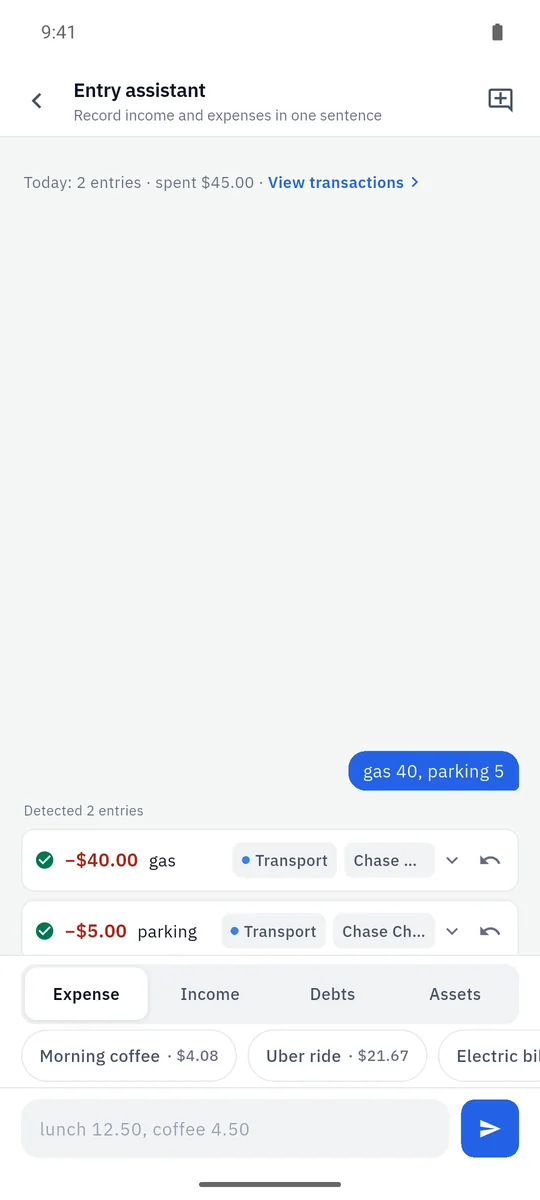
You can keep several wallets, set category budgets and get an alert when a category is close to its limit, and set up recurring rules for rent and bills. A daily reminder nudges you at 2 PM if you haven't logged anything that day, and a weekly summary shows the week's income and spending. Notifications only arrive between 7 AM and 10 PM, and you can turn any of them off. New accounts get every feature free for 30 days. After that, the Free plan keeps your records and the main features, with limits on the number of wallets, budgets, recurring rules and open debts.
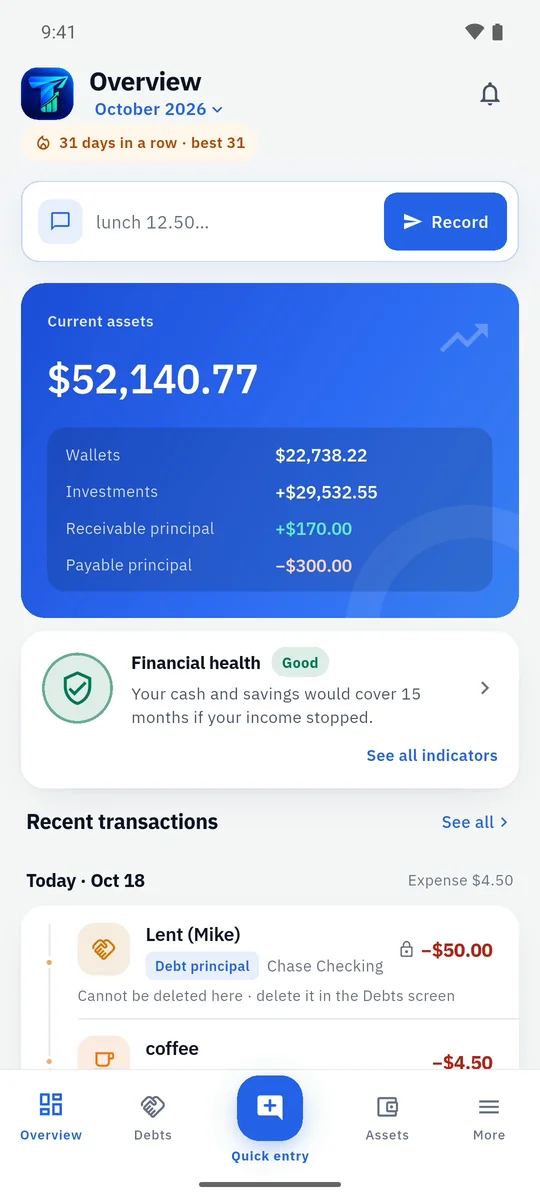
Money you lend lives in the same app. The Debts tab tracks who owes you and what you owe, with due date reminders and a private link you can send to compare notes. For bigger family loans, see our guide on lending money to family.
Get Tivelis and log your first expense in one line. No bank login, ever.